
Hey,
Here are answers to your questions below:
Well, that is our first clue. The lack of the “found” light indicates the software is unable to connect to your SSC-32U.
Unfortunately, the issue is independent of the SSC-32U and is related to the VCP (Virtual COM Port) drivers used. This we have no control over and there has been multiple instances of Windows users having the wrong drivers installed. This is especially true of Windows 10 which for a while did driver updates automatically without user confirmation, often breaking working setup (not just for the SSC-32U but for many other software/products/etc. You can find plenty of reports online concerning these issues).
Your best bet at this point would be to change the PID of the SSC-32U’s FTDI chip as seen in my previous solution.
The idea is that your computer is most likely currently using either an invalid FTDI driver to talk to your chip or one that does not recognize your chip in the SSC-32U. Therefore, the easiest option in such a case is to simply tell the chip to have a different ID (using FT_Prog), which allows you to install a proper driver that will work. You can follow the full steps with pictures here.
As for finding the drivers once the device’s PID is changed disconnecting it from USB and reconnecting should be enough to trigger new drivers to be installed automatically (also known as P&P or Plug & Pra… Play!  ). If it doesn’t than you can use the ones found here.
All of that being said, you may still want to test your connectivity using Lynxterm, our free diagnostic and configuration tool.
You can check the steps here to verify your current VID/PID. Some bad drivers have in the past being known to erase the PID (and therefore rendering the device useless). Luckily, this can be fixed with the FT_Prog utility (see link above for steps).
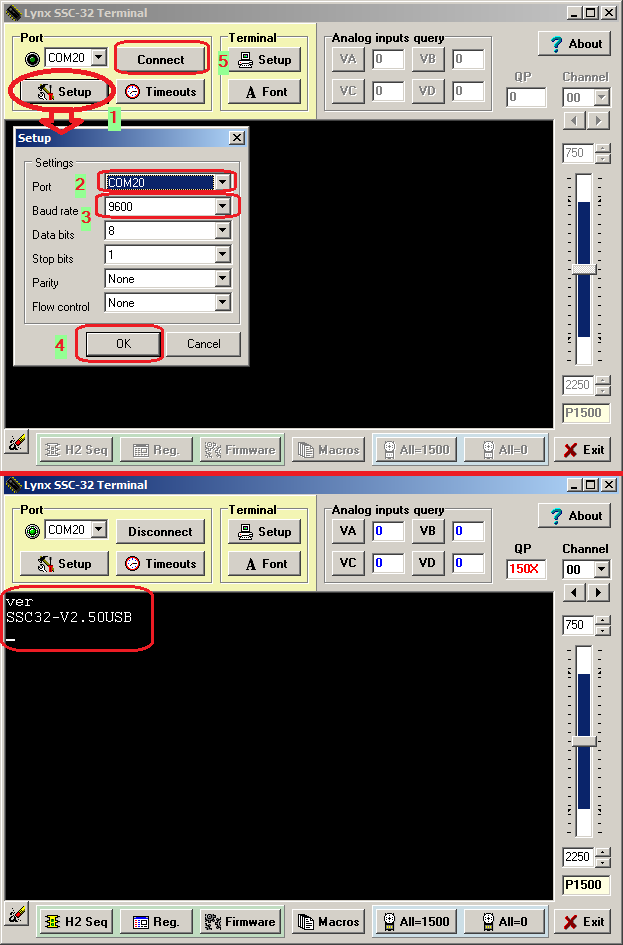
You can connect with Lynxterm and try and see if it responds to “VER” with the firmware version. See the image of the steps here.
Also, you can confirm the baud rate of your SSC-32U by powering it up (6 V DC >> VS1 terminal, USB does not power the board, only the interface) and press the BAUD button once. See details in the SSC-32U manual, page 34 (lower half).
I hope this helps you get this working again.
Sincerely,
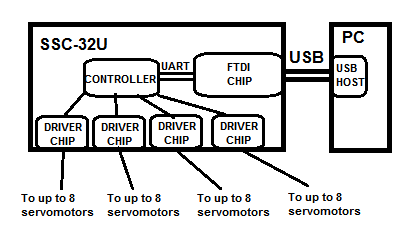
P.-S.: Here’s a quick summary of how everything is connected. It may help get a better idea of how the communication works between your PC/Sequencer software and your servomotors!